Page History: XSPFPlayer v3.0 - Specs & Features
Compare Page Revisions
Page Revision: 2009/06/17 15:29
|
XSPF Player 3.0 Overview –
|
The Stand Alone Player (XSPF Player) is an online application that consumes a dynamic web service provided by
UnityWorks! Media to display a flowing video content experience. The application runs off multiple web services generating
XML Sharable Playlist Format (XSPF) which the player consumes. The player will play specific videos upon certain criteria compiled by the UnityWorks! Media systems.
XSPFPlayer v3.0 Beta - Additional Confuguration Examples
|
Scrub Bar Functionality –
|

The scrub bar will allow the user to navigate through the video tracks at ease. The red rectangle indicates your playback and video scrub functionality. The yellow area represents the elapsed video. The white area indicates the total buffer/download of the video. The object located at the top left corner indicates the status of the video feed. Preset streaming video will not display any download indicator.
|
Default Basic Player Functionality –
|
| Functions |
Description |
| Play |
Plays current track |
| Pause |
Pauses current track |
| Rewind |
Rewinds all tracks |
| Mute |
Mutes current video |
|
Open Flash Object Values–
|
These values are available at the flash object code level. These attributes can be changed easily through the flash object without worries on damaging what UWM actually delivers. The XSPFPlayer and its content will resize to the specified values. Video quality will adjust.
| Attributes |
Values |
| Width |
Open Value (default values - used 320, new 420) |
| Height |
Open Value (default values - used 240, new 288) |
|
Contact Form PlugIn / ADF –
|
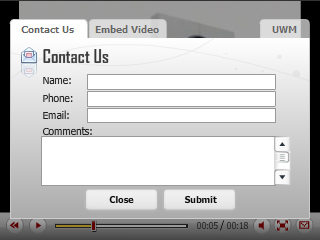
If the application’s configuration has enabled “PluginEnabled” (ADF Enabled), the player will launch a window upon clicking the envelope icon. The user/client will have the ability of filling out a contact form. If the original configuration contains an ADF plugin, it is possible to turn it off at the flash code object level. The original configuration can only be handled by
UnityWorks! Media.
| Flash Vars |
Values |
Description |
| PluginEnabled |
true, false (Boolean) |
Displays Contact Form |
|
Sharing/Embedding Video –
|
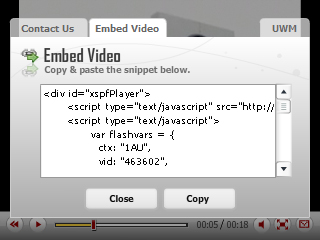
If the application’s configuration has enabled “SharingEnabled”, the player will launch a window where the user/client will have the ability of copying the current video code to an alternate host location. The shared generated code will have the original player settings coming from the
UnityWorks! Media servers. However, if the player attributes have been manually altered though the snippet, the generated code will ignore these settings and revert back to the original version.
| Flash Vars |
Values |
Description |
| SharingEnabled |
true, false (Boolean) |
Displays sharing tab option |

If the application’s configuration has enabled “DisplayUWLogo”, the player will launch a window when the user clicks on the envelope icon but only "if" the ADF Plugin and SharingEmbed options have been disabled. Otherwise, only a tab will be available. This feature could be turned off within the original configuration or at the flash object code level.
| Flash Vars |
Values |
Description |
| DisplayUWLogo |
true, false (Boolean) |
Displays UWM contact tab option |

The XSPF Player has the capability of displaying Carfax’s services. This option will be displayed on the upper area of the video upon the clients activation through UWM. It will only be activated if the specific vehicle video has a Carfax report. The user is also able to view a more extensive version of the report by clicking the Carfax tab or logo. Click the ( x ) icon to close.
If the application’s configuration has enabled "CarfaxValue", the player will launch a carfax window when the user click on the "CF" icon if available. Otherwise, the Carfax overlay will automatically launch on the tagged vehicle with the carfax information after 7-10 seconds from when the vehicle begins play.
| Flash Vars |
Values |
Description |
| CarfaxValue |
On, On_NoAutoDisplay, Off (String) |
Displays Carfax if available |

The application has a fullscreen feature allowing any video to overtake the user screen. Contact/ADF forms and any additional features configured into the player will cancel the fullscreen feature if currently activated. This feature is disabled to all products which consume the player, even if configured correctly.
| Flash Vars |
Values |
Description |
| FullScreen |
true, false (Boolean) |
Fullscreen Option |






|
Additional Possible Settings –
|
| Flash Vars |
Values |
Description |
| AutoStart |
true,false (Boolean) |
Video auto play |
| ControlBehavior |
Static,Rollover (String) |
Alters Controls Interaction |
| IsMuted |
true,false (Boolean) |
Mutes video playlist |
| exeFunction |
URL, functions, etc. (String) |
URL will launch once video is complete. See below.(Could also target frames, scripts, etc.) |
| exeTarget |
_blank,_parent,_self, etc. (String) |
Targets exeFunction URL. See below.(Could also target frames, scripts, etc.) |
| UWMmark |
true,false (Boolean) |
Displays the UWM watermark |
|
EXE External Interface Commands –
|
The Stand Alone XSPF Player has the option of launching/executing a command once the playtracks have reached completion. The action can basically be anything, from a URL to a JavaScript function. Due to security reasons, the allowScriptAccess parameter is required for “_self” target commands. The integration application code below is required to have the following parameters for functionality. Please see the integration links above for more details.
variable: exeFunction, COMMAND
variable: exeTarget, TARGET
For additional External Interface Integration:
- XSPFPlayer External Interfaces
In all instances of the SWF application a cookie will be stored in the customer’s computer increasing the number of plays by context played if allowed. By doing so, the user will obtain different content/videos, taking full advantage of the dynamic delivery concept. Cookies have an expiration counter of
24 hours. After this predetermined time, the cookie will be reset.
The player will automatically report successful plays, completed videos, errors, bugs, and the occasional user browser OS/browser if applicable. Reports will be sent to
UnityWorks! Media for processing.